Assets
Asset Management provides a comprehensive, centralized system for managing the complete lifecycle of all your technology assets—from hardware and software to consumables—to optimize costs, ensure compliance, and reduce risk.
ServiceOps Asset Management offers automated discovery, lifecycle management, and financial tracking capabilities to streamline asset management.
At its core, Asset Management is the practice of ensuring an organization's assets are accounted for, deployed, maintained, upgraded, and disposed of when the time comes. ServiceOps provides a robust Asset Management module to give you complete visibility and control over your entire IT estate.
Asset Management Lifecycle
The Asset Management lifecycle is a continuous process that encompasses the following stages, providing a structured approach to managing IT assets from inception to disposal.
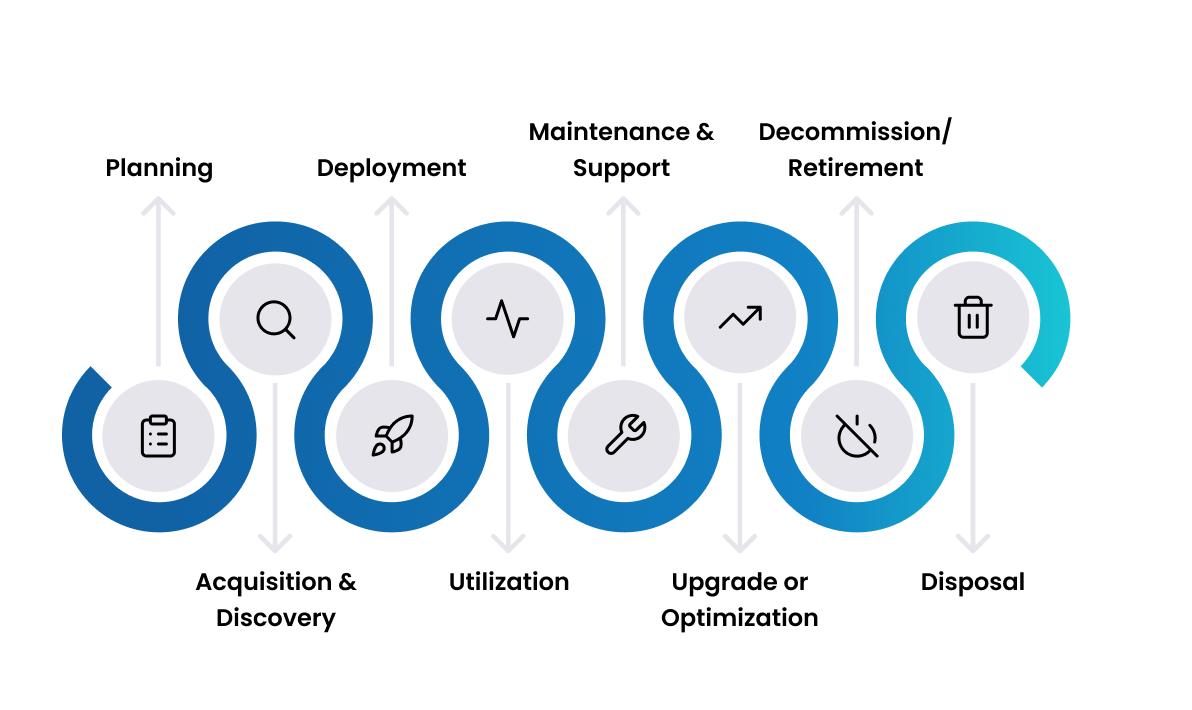
- Planning: This initial stage involves defining the organization's asset requirements based on business needs, forecasting future demands, and establishing clear asset management policies and procedures. It includes budgeting for asset procurement and defining the standards for hardware and software that will be used across the organization. Effective planning ensures that asset acquisition is aligned with strategic goals and financial constraints.
- Acquisition & Discovery: Once the need for an asset is identified, this stage involves procuring it through various methods such as purchasing, leasing, or licensing. Concurrently, discovery processes are run to identify all existing assets within the IT environment. ServiceOps supports both agent-based and agentless discovery to automate this process, ensuring a comprehensive and accurate inventory. For details on discovering assets, refer to Automated Discovery in ServiceOps.
- Deployment: In this stage, assets are installed, configured, and integrated into the IT environment. This includes setting up hardware, installing necessary software, and ensuring that the asset is ready for use by end-users or systems. Proper deployment is crucial for seamless integration and minimizing disruption to business operations. Learn more about Deployment Planning.
- Utilization: This is the operational phase of the asset's life, where it is actively used to deliver value. The focus here is on monitoring the asset's usage, performance, and compliance with organizational policies and regulatory requirements. This includes tracking Hardware Assets and managing Software Assets to ensure they are being used efficiently and effectively.
- Maintenance & Support: To ensure assets continue to function optimally and deliver value, regular maintenance is performed. This stage includes scheduled check-ups, applying updates, managing repairs, and handling support requests. It also involves managing vendor contracts and service level agreements (SLAs) to ensure timely support. See Contract Management for related processes.
- Upgrade or Optimization: Over time, assets may require upgrades to enhance their capabilities, improve performance, or address security vulnerabilities. This stage involves evaluating the need for an upgrade, planning the upgrade process, and executing it with minimal disruption. It also includes optimizing asset configurations to extend their useful life and maximize return on investment. Find information on Upgrade Guides for various components.
- Decommission/Retirement: When an asset is no longer needed, becomes obsolete, or reaches the end of its useful life, it is decommissioned. This stage involves formally retiring the asset from active service, which includes uninstalling software, revoking user access, and updating asset records.
- Disposal: The final stage of the lifecycle is the secure and environmentally responsible disposal of retired assets. This includes processes like data sanitization to remove sensitive information, followed by recycling, reselling, or donation of the physical components. Proper disposal is essential for data security and regulatory compliance.
To illustrate these stages with a practical example, let's explore the Laptop Asset Lifecycle in detail.
Laptop Asset Lifecycle
The Laptop Asset Lifecycle in ServiceOps outlines the end-to-end management of a laptop asset from initial requirement to final disposal. This use case highlights how ServiceOps capabilities facilitate efficient and compliant management of hardware assets.
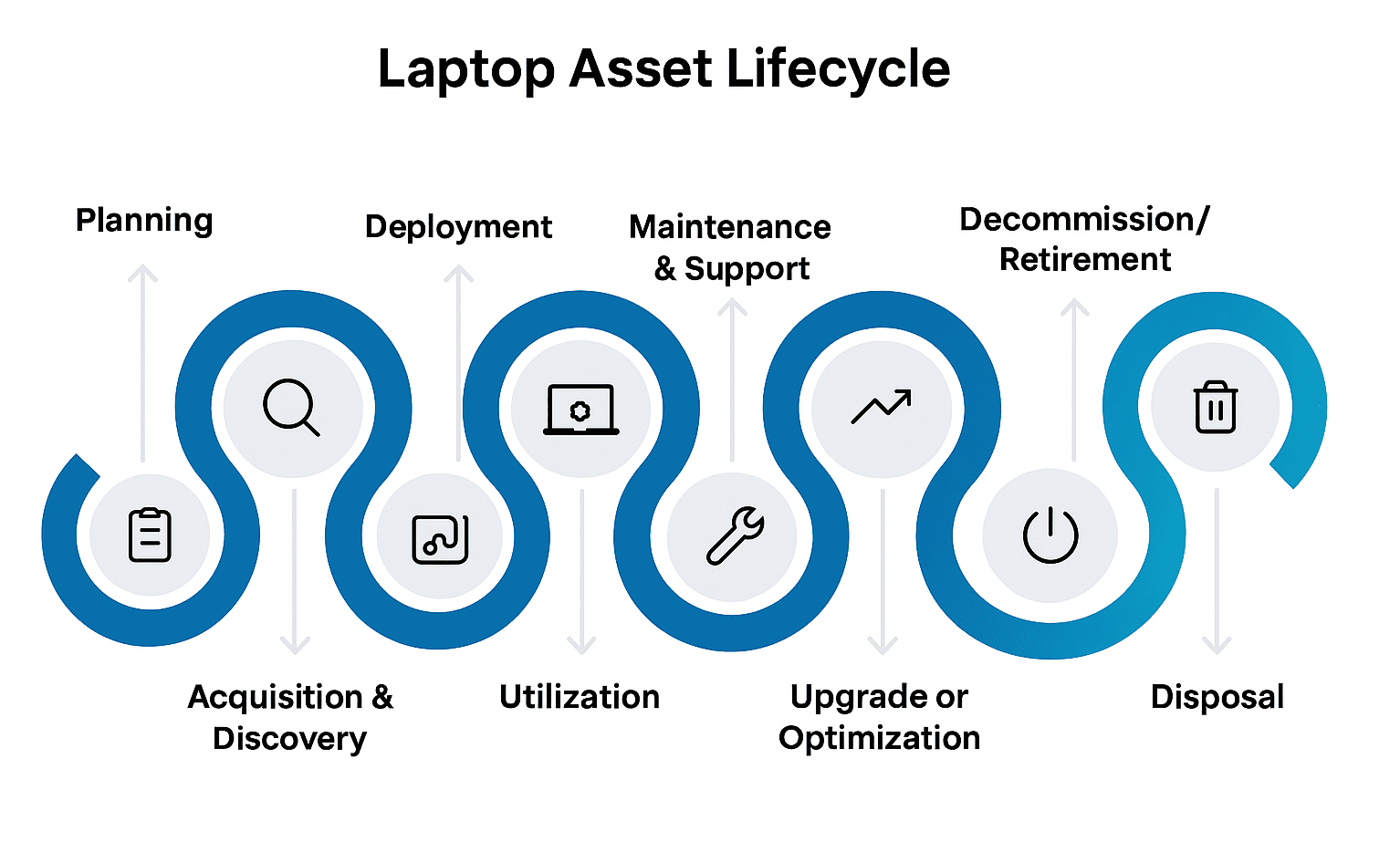
Planning: Define laptop requirements, budget, and organizational policies.
- Related Links:
Acquisition & Discovery: Procure, tag, and automatically discover laptop hardware/software, integrating with CMDB.
Deployment: Configure, assign, network-integrate, and track laptop deployment.
- Related Links:
Utilization: Ensure software compliance, maintain security, and track usage for cost optimization.
- Related Links:
Maintenance & Support: Manage incidents, diagnose, repair, address problems, and deploy updates for laptops.
Upgrade or Optimization: Decide to upgrade or replace laptops based on performance/lifecycle data, and optimize software.
- Related Links:
Decommission/Retirement: Change asset status, sanitize data, deactivate licenses, and revoke user access for retired laptops.
Disposal: Record disposal method, ensure compliance, and mark the end of the laptop's lifecycle.
Asset Types in ServiceOps
ServiceOps allows you to manage the full spectrum of your organization's assets.
- Hardware Assets: Manage the lifecycle of physical IT devices like computers, servers, and network equipment.
- Software Assets: Track software installations, manage licenses, and ensure compliance to avoid legal risks and overspending.
- Non-IT Assets: Extend asset management beyond IT to track any other valuable company assets, such as vehicles, furniture, or equipment.
- Consumable Assets: Keep track of disposable items like printer papers, mouse pads, etc. that are not individually tracked after deployment.
Key Capabilities & Benefits
ServiceOps Asset Management provides a robust set of features designed to help organizations gain complete control over their IT assets, optimize costs, and ensure compliance throughout the entire asset lifecycle. These capabilities translate into significant business benefits and address common use cases.
Core Features
- Automated Discovery: Automatically discover all assets on your network using agent-based or agentless scanning, reducing manual effort and ensuring a complete inventory.
- Lifecycle Management: Track and manage assets through every stage, from procurement and deployment to maintenance, retirement, and disposal.
- Financial Tracking: Monitor purchase costs, manage warranties and contracts, and calculate depreciation to understand the total cost of ownership (TCO) of your assets.
- CMDB Integration: Seamlessly sync assets with Configuration Items (CIs) in CMDB to map dependencies and understand the impact of assets on business services.
Business Benefits
- Complete Visibility: Gain a single, accurate source of truth for your entire IT asset inventory.
- Cost Optimization: Identify underutilized or shadow assets, eliminate redundant software, and negotiate better vendor contracts to reduce spending.
- Risk Reduction: Proactively manage compliance for software licenses and hardware warranties, and identify security risks associated with outdated or unauthorized assets.
- Operational Efficiency: Automate routine asset management tasks, streamline workflows, and provide support teams with accurate asset data to resolve issues faster.
Common Use Cases
- Hardware & Software Inventory: Maintain a real-time, accurate inventory of all physical and digital assets.
- Software License Compliance (SLC): Prepare for audits by tracking license allocations against actual usage and avoiding non-compliance penalties.
- Asset Refresh Planning: Use lifecycle and financial data to plan and budget for hardware replacements and software upgrades.
- Cost Allocation: Accurately assign asset costs to specific departments or business units for chargeback and budgeting.
Implementing the Asset Management Lifecycle in ServiceOps
To effectively manage your assets using ServiceOps, follow these practical steps, which align with the Asset Management Lifecycle:
- Plan & Govern (Planning): Start by deciding which types of assets matter most for your organization (laptops, servers, software, licenses, cloud subscriptions, etc.). Set some basic policies so everyone understands how assets should be tracked and managed.
- Discover & Record (Acquisition & Discovery): Use agent-based or agentless discovery tools to scan your environment and automatically build your asset inventory. This step ensures you know what you have, instead of relying only on spreadsheets or guesswork.
- Classify & Control (Deployment): Organize your assets into clear categories (hardware, software, network devices, cloud services) and assign ownership. This keeps your inventory structured and makes it easier to link assets back to people, services, or costs.
- Deploy & Operate (Utilization & Maintenance): Track assets as they are purchased, deployed, and used. Connect Asset Management with daily IT operations (incidents, changes, problems) so you always know the state and health of your assets.
- Retire & Optimize (Decommission/Retirement & Disposal): Finally, when assets reach end of life, make sure they are decommissioned securely and responsibly. Regularly review your asset data to optimize usage, reduce costs, and stay compliant.
Related Topics
- CMDB Management: Understanding how assets integrate with configuration management.
- Change Management: Managing changes to assets.
- Incident Management: Managing incidents related to assets.
- Problem Management: Addressing underlying problems affecting assets.
- Service Request Management: Handling service requests pertaining to assets.
- Patch & Package Management: Managing software patches and package deployments for assets.
- Purchase Management: Understanding the lifecycle of asset procurement.