Service Request Management
Service Request Management provides a structured, efficient process for handling routine, pre-approved requests for IT services, access, or resources through a user-friendly service catalog.
Unlike an incident (an unplanned disruption), a service request is a formal request for something new or a standard change, such as a new laptop, software access, or a password reset. The goal is to provide a seamless, standardized fulfillment process that ensures users get what they need quickly and reliably.
Benefits of Service Request Management
Implementing a structured Service Request Management process provides significant benefits to both IT teams and the business:
- Improved Efficiency and Productivity: Automating the entire lifecycle—from submission to approval and fulfillment—reduces manual effort and minimizes the risk of human error.
- Enhanced User Experience: A centralized service catalog provides a single, user-friendly place for users to find and request the services they need, improving satisfaction and perception of IT.
- Better Governance and Control: Standardized workflows and approval processes ensure that all requests are properly authorized, tracked, and documented, which is crucial for security and compliance.
- Optimized Resource Management: Centralizing requests provides clear visibility into service demand, allowing managers to allocate resources more effectively and identify trends for better strategic planning.
Service Request vs. Incident
It's crucial to distinguish between a service request and an incident, as they are handled through different processes.
| Aspect | Service Request | Incident |
|---|---|---|
| Nature | A planned, pre-approved, or standard request. | An unplanned disruption or service degradation. |
| Priority | Typically low to medium. | Can range from low to critical. |
| Process | Follows a standardized, repeatable workflow. | Requires investigation and diagnosis to restore service. |
| Goal | To fulfill a user's request for a service. | To restore normal service operation as quickly as possible. |
For a detailed explanation of how to handle unplanned service disruptions, see Incident Management.
The Service Request Lifecycle
The lifecycle outlines the end-to-end journey of a service request, from the moment it's raised to its fulfillment and closure, ensuring a consistent and predictable process.
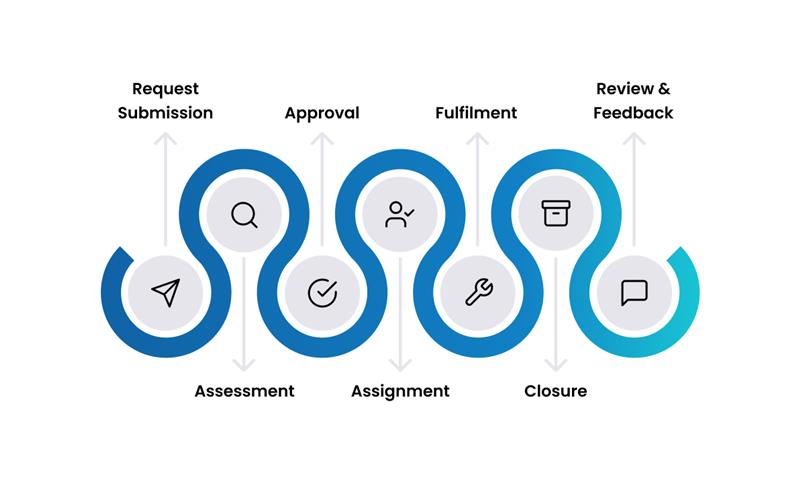
1. Request Submission
The process begins when a user submits a request through a designated channel, most commonly a self-service portal. By using a standardized form from the Service Catalog, all necessary information—such as user details, service options, and business justification—is captured accurately from the start. This minimizes back-and-forth communication and sets the stage for an efficient workflow.
2. Assessment
Once submitted, the request undergoes an initial assessment. This step, which can be automated or manual, involves verifying the completeness of the information, ensuring the request is categorized correctly, and determining its priority. The goal is to confirm that the request is valid and ready for the next stage without any ambiguities.
3. Approval
For requests that involve sensitive data, financial costs, or significant resource allocation, a formal approval stage is triggered. The system automatically routes the request to the appropriate approver(s)—such as a line manager, department head, or financial controller—based on predefined workflows. Approvers can review the request details and justification before approving or rejecting it, ensuring proper governance and control.
4. Assignment
After approval, the request is assigned to a specific technician or a fulfillment group. This can be automated based on various factors like team workload (round-robin), required skills, or geographic location. The system can also create and assign a series of dependent tasks to different teams if the fulfillment process involves multiple steps or departments.
5. Fulfillment
This is the stage where the service is delivered. The assigned fulfillment team carries out the necessary tasks, which could range from simple actions like granting software access to complex processes like procuring and configuring a new laptop. Progress is tracked against the defined Service Level Agreement (SLA) to ensure timely delivery, and the user is kept informed of the status.
6. Closure
Once the fulfillment tasks are complete and the service has been delivered, the user is asked to confirm that they have received the service and that it meets their expectations. Upon confirmation, the ticket is formally closed. A complete history of all actions, communications, and approvals is recorded in the ticket for auditing and reporting purposes.
7. Review & Feedback
The final stage focuses on continuous improvement. After closure, the system can automatically send a satisfaction survey to the user. This feedback is invaluable for measuring the quality of the service delivery, identifying process bottlenecks, and refining the offerings in the service catalog.
Common Use Cases
To illustrate the process in action, here are a couple of real-world examples:
- Scenario 1: Requesting a New Software License
- Scenario 2: Onboarding a New Team Member
- Submission: A project manager realizes their team needs a license for a new design tool. They navigate to the "Software" category in the service catalog, fill out the form for the specific tool, and add a business justification.
- Assessment: The system automatically checks that all fields are complete.
- Approval: Because the software has a cost associated with it, the request is automatically routed to their department head for financial approval. The department head receives an email and approves it with one click.
- Assignment: The request is assigned to the "Software Provisioning" team.
- Fulfillment: A technician in the team procures the license, assigns it to the user, and sends them the installation instructions.
- Closure: The project manager confirms they have access to the software, and the ticket is closed.
- Feedback: They receive an email survey and give the process a 5-star rating.
- Submission: A hiring manager uses the "New Employee Onboarding" service item. This single request bundles multiple services. The manager fills out one form with the new employee's details, start date, and required software.
- Assessment: The system verifies the form's completeness.
- Approval: The request is approved by the HR department.
- Assignment & Fulfillment: This is where the power of automation shines. The system automatically creates and assigns multiple child tasks to different teams:
- IT Hardware: Provision a laptop and monitor.
- IT Software: Create an email account and grant access to standard applications.
- Facilities: Assign a desk and security badge.
- Closure: Once all individual tasks are marked as complete, the parent request is automatically closed.
- Feedback: The hiring manager is asked to rate the overall onboarding experience.
Roles and Responsibilities in Service Request Management
- Requester (End-User): The individual who initiates a request for a service from the catalog. Their main responsibility is to provide complete and accurate information in the request form and to confirm once the service has been delivered to their satisfaction.
- Approver: An individual, often a manager or department head, who is responsible for authorizing a request before it proceeds to fulfillment. Their role is to ensure the request is justified, compliant with company policies, and within budget.
- Fulfillment Team / Technician: The individual or group responsible for carrying out the tasks required to deliver the requested service. Their duties can range from provisioning resources and installing software to providing access and information.
- Service Catalog Manager: This strategic role is responsible for maintaining the service catalog, ensuring that the services offered are accurate, relevant, and aligned with business needs. They also focus on optimizing the request workflows for efficiency.
Key Capabilities
ServiceOps provides a comprehensive set of features to manage the entire service request lifecycle efficiently.
Self-Service Portal
Centralized Access: Acts as a one-stop shop for all IT services and knowledge.
Request Tracking: Empowers users to check the status of their open requests in real-time, reducing the need for follow-up calls or emails.
Knowledge Integration: Seamlessly integrates with the knowledge base, suggesting relevant articles to users before they submit a request, which promotes self-help and deflects tickets.
Service Catalog
- Structure & Organization: Services are organized into logical categories (e.g., Hardware, Software, Access) to ensure users can easily find what they need.
- Custom Forms & Templates: Each service item uses a custom form to capture all necessary information upfront, using conditional logic to show or hide fields as needed.
- Service Bundles: For complex, multi-step processes, multiple individual services can be bundled into a single catalog item. For example, a "New Employee Onboarding" request can automatically trigger a series of child tasks for different teams (hardware provisioning, account creation, software access), all initiated from one simple form.
Workflow & Automation
- Multi-Channel Creation: Capture requests from a web portal, mobile app, email, chatbot (MS Teams, Slack), or APIs.
- Status Management: Track requests through a customizable lifecycle (e.g., Submitted → Approved → In Progress → Closed) with automated status transitions.
- Intelligent Routing: Automatically assign tickets to the right technician or group based on service type, skills, or location.
- Task Dependencies: For complex requests, create automated workflows with parent-child tasks. A subsequent task can be automatically triggered only after a preceding one is completed, ensuring processes are followed correctly.
- Notifications: Keep stakeholders informed at every stage with automated email or mobile notifications.
- Cost and Resource Tracking: Associate costs with service items for showback or chargeback, and track resources consumed during fulfillment for better financial planning.
Approval Management
- Flexible Workflows: Configure single-stage, multi-stage, parallel, or sequential approval workflows.
- Conditional Routing: Route approvals based on request details, such as cost or risk level.
- Easy Management: Approvers can review, approve, or reject requests via email or the self-service portal, with options for delegation and bulk approvals.
To prevent requests from getting stuck, it's crucial to configure escalation rules. If an approver doesn't respond within a set timeframe, the system can automatically re-route the approval to an alternate manager or send reminders to ensure the process keeps moving.
Measuring Success: Key Metrics (KPIs)
Key Performance Indicators for Service Request Management
Measuring the right KPIs is essential for understanding performance and driving continuous improvement. Key metrics include:
- Average Fulfillment Time: The average time taken to complete a specific service request, from submission to closure. This helps in setting realistic user expectations.
- User Satisfaction (CSAT): Typically measured through post-fulfillment surveys, this is the most direct indicator of service quality from the user's perspective.
- SLA Compliance Rate: The percentage of service requests that are fulfilled within their defined Service Level Agreement (SLA) timelines.
- First-Contact Fulfillment Rate: The percentage of requests that are successfully fulfilled by the first assigned team without needing to be reassigned or escalated. This is a strong indicator of process efficiency and correct routing.
- Cost Per Request: The total cost associated with fulfilling a particular type of service request, which is useful for budgeting and financial planning.
Best Practices & Integrations
Best Practices
- Design for Simplicity: Design your service catalog from the user's perspective. Use clear, non-technical language in service descriptions and limit the number of options to avoid overwhelming users.
- Standardize and Automate: Use templates for all common requests to ensure consistency. Automate routing, approvals, and notifications wherever possible to reduce manual effort and accelerate fulfillment times.
- Communicate Proactively: Keep users informed about the status of their requests at every step of the lifecycle. Transparency builds trust and reduces follow-up inquiries.
- Establish a Review Cadence: Form a small governance team to review service catalog performance, user feedback, and fulfillment metrics quarterly. This helps identify and retire unused services and continuously optimize the process.
A regular review cadence is the most effective way to prevent "catalog sprawl," where the service catalog becomes cluttered with outdated or irrelevant items. Keep it lean and focused on what the business actually needs.
Integrations
Service requests are rarely isolated. Integrating with other processes provides end-to-end visibility and control.
- Asset Management: Automatically link requests to asset provisioning, track software licenses, and manage the entire asset lifecycle. See Asset Management.
- Change Management: Automatically generate a standard change record for routine requests that require formal tracking. See Change Management.
- Knowledge Management: Provide users with relevant documentation or self-help articles directly within the service request form. See Knowledge Management.
- External Systems: Connect with HR systems for user data, procurement systems for ordering, or identity management systems for access control.
Security & Compliance
- Access Control: Use role-based permissions to control who can request, view, and approve specific services.
- Data Privacy: Ensure sensitive data is protected throughout the request lifecycle.
- Audit Trails: Maintain a complete, unalterable record of every action taken on a request for compliance and auditing purposes.
Related Topics
- Incident Management: Understanding the difference between incidents and service requests.
- Asset Management: Linking service requests to asset provisioning.
- Change Management: When service requests require formal change processes.
- Knowledge Management: Creating service documentation and user guides.